Netscape Navigator
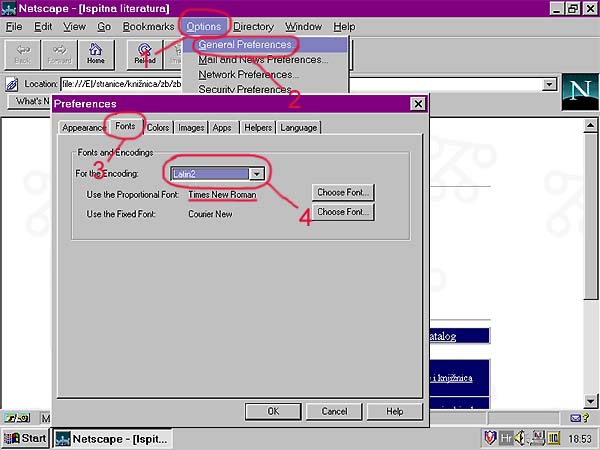 U izbormiku "Options" odaberite opciju "General Preferences".
U slijedećem prozoru, kliknite na gumb "Fonts" i zatim u izborniku
"For the Encoding" odaberite opciju "Latin2", a u izborniku "Use the Proportional
Font" pomoću gumba "Choose Font..." izaberite bilo koji font koji podržava
hrvatska slova (npr. Times New Roman...)
U izbormiku "Options" odaberite opciju "General Preferences".
U slijedećem prozoru, kliknite na gumb "Fonts" i zatim u izborniku
"For the Encoding" odaberite opciju "Latin2", a u izborniku "Use the Proportional
Font" pomoću gumba "Choose Font..." izaberite bilo koji font koji podržava
hrvatska slova (npr. Times New Roman...)